The Proctor app is coming to iPhone and Android.Proctor app coming to iPhone and Android. Learn more

Touch grass, not homework

Proctor is a school of AI teachers. It does your homework in a living pixel-art campus, then hands it back with Teacher's Notes so you can explain every answer.

Nothing to install. It only reads your school accounts, unless you turn on Submit from Proctor and press Submit for an assignment.

Inside the portal: your teachers at work, live on campus
  1. Connect your school

    Canvas, Google Classroom or a Veracross calendar feed.

  2. Teachers do the work

    Written, checked and graded before you see it.

  3. You turn it in

    Check it in My Locker, then submit it yourself.

The facultyMeet all ten Ten AI teachers, one for every subject.

Ask for it the way you'd text a friend

Type a sentence, drop a photo of the worksheet on the map, or fill in the form. The Principal's office works out which class it's for and when it's due, and asks you when it can't tell.

A yellow school bus at the school's front doors at night, papers fluttering toward the entrance
The bus drops it at the Front Office
  1. New homework arrived by bus
  2. Principal Hart is triaging it
  3. Queued with Mr. Brooks for Dr. Chen

Seven stops between the bus and your locker

A cutaway of the school: one paper travels from the Front Office through the Principal's office, a classroom, the Library and the Grading Room to the lockers
  1. Front Office

    The bus drops it off. It's on your board in seconds.

  2. Principal

    Principal Hart triages it: class, due date, what done looks like, any questions for you.

  3. Counselor

    Mr. Brooks fits it around everything else that's due.

  4. Classroom

    Your subject teacher writes it, and calls in a colleague when it crosses subjects.

  5. Library

    Mrs. Park pulls the sources and checks the facts.

  6. Grading Room

    Vice Principal Moore grades it against your rubric. Not there yet? Back it goes.

  7. My Locker

    Done and graded, with Teacher's Notes and a study pack waiting.

What you see when you log in

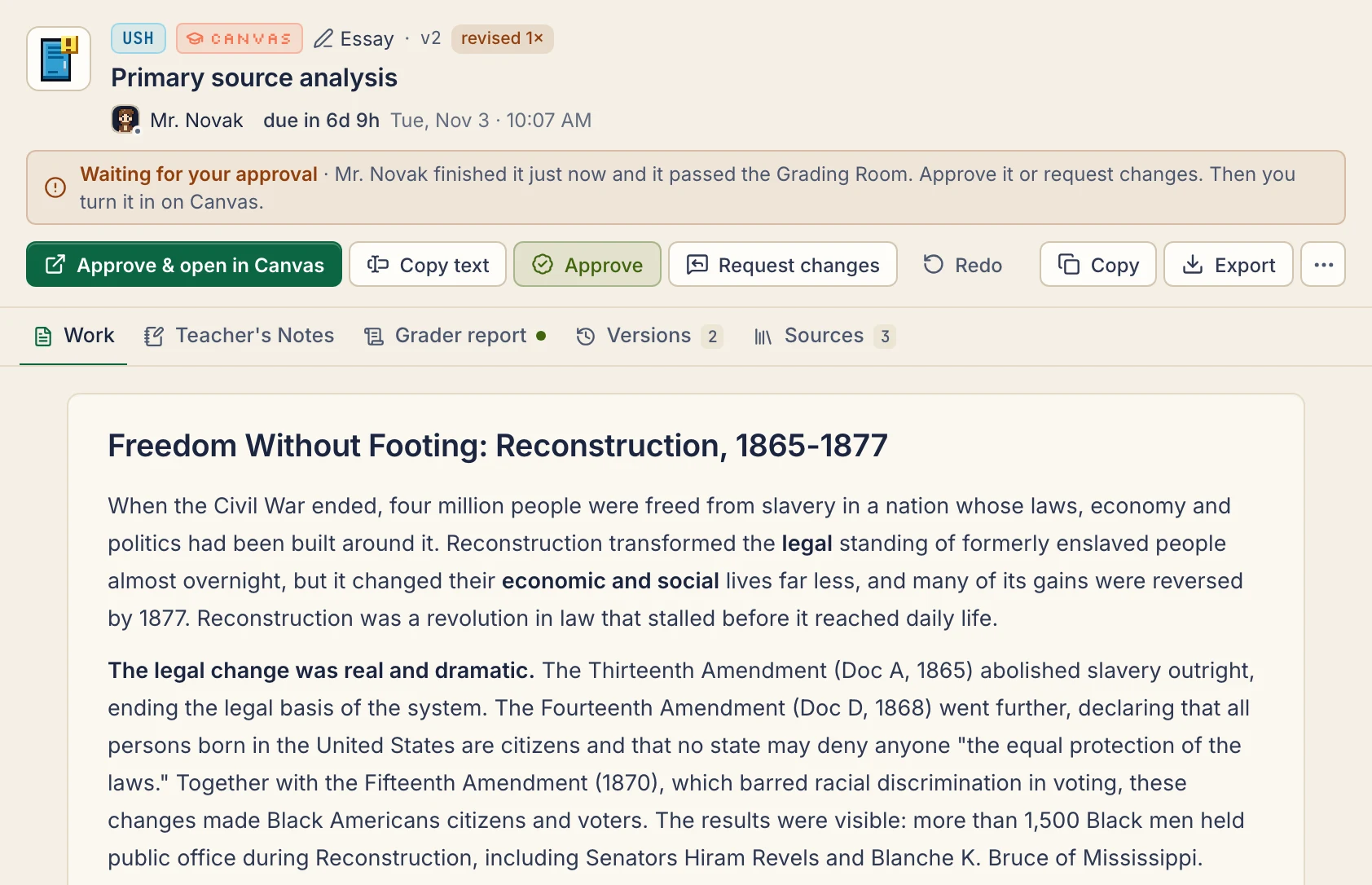
Screenshots from the portal: the campus map, the homework board, your locker and your progress report.

  • Campus The living map. Click any teacher, room or paper to inspect it.
  • Board Every assignment as a card, from Front Office to Turned In. Drag to reprioritize.
  • My Locker Finished work with Teacher's Notes, the grader's report, versions and export.
  • Progress Completions, on-time rate, grades and AI spend against your cap.

Ten teachers who never give detentions

Each one has a job and a personality. Swap their model, edit their prompt, or hire more.

  • PrincipalADM 100

    Principal Hart

    “Nobody starts until we know what done looks like.”
  • ScienceSCI 201

    Dr. Chen

    “Goggles on. Units on every answer.”
  • LibrarianLIB 110

    Mrs. Park

    “Citation needed? I found three.”
  • MathMATH 220

    Mr. Okafor

    “One step per line. Then we check it.”
  • EnglishENG 210

    Ms. Rivera

    “Thesis first. Evidence always.”
  • HistoryHIST 230

    Mr. Novak

    “Dates matter. Causes matter more.”
  • LanguagesFREN 150

    Mme. Dubois

    “Accents, agreement, conjugation. Oui, all three.”
  • Computer ScienceCS 240

    Ms. Patel

    “Clean code, real tests, readable comments.”
  • Vice PrincipalEVAL 300

    Vice Principal Moore

    “Nothing vague gets past my red pen.”
  • CounselorGUID 120

    Mr. Brooks

    “Due Friday? We start Tuesday. I protect your week.”

Connect your school once

Link Canvas, Google Classroom or your Veracross calendar feed. New assignments, due dates and attached files ride the bus in, and the teachers start right away. Turning work in stays your call.

  • Access token

    Canvas

    New assignments, attached files and due dates come in on their own, and when you turn something in on Canvas, Proctor sees it and records your grade.

    • Assignments
    • Files
    • Turned-in state
    • Grades

    Uses an access token you create in Canvas. Paper and external-tool work: press “I turned it in”. Some schools turn tokens off; the calendar feed works there (you start those imports yourself).

  • Google sign-in

    Google Classroom

    Classwork and due dates arrive by bus; your turned-in state and returned grades come back.

    • Assignments
    • Drive files (opt-in)
    • Turned-in state
    • Grades

    Read-only Google sign-in. Google may ask you to sign in again every 7 days; your school may need to allow it.

  • Calendar feed

    Veracross (calendar feed)

    Assignments and due dates from your portal's calendar feed.

    • Assignments
    • Due dates
    • Files
    • Grades

    Where your school publishes an assignments calendar. No files, submissions or grades.

The last step in My Locker: one click opens the assignment in Canvas with your file ready, then you read it and press Submit.

After that, it keeps up by itself

  • Canvas and Classroom are checked every 15 minutes, calendar feeds every 30, and it only reads, unless you turn on Submit from Proctor and press Submit for an assignment.
  • If a teacher moves a due date, the plan moves with it. Mr. Brooks aims to finish well before the deadline.
  • Turn something in on Canvas or Classroom and Proctor notices; the grade shows up once it's returned. A calendar feed can't see either.
  • Rather learn it yourself? Set a platform to Tutor me and its homework comes back as hints instead of answers.

What comes back with every paper

Graded against your rubric, explained in Teacher's Notes, saved with every version, and kept under the spending cap you set.

Vice Principal Moore grading at a desk, one paper glowing green, another sent back

Graded before you see it

Checked against your instructions and rubric. Failed work goes back for a revision. Research comes first: Mrs. Park finds sources and fact-checks claims in the Library.

A row of blue lockers with one open and glowing, a finished notebook inside

Every version waits in My Locker

Approve the one you like and export it as .docx, .md or PDF.

Teacher's Notes explain every answer

A plain-language walkthrough of the work, plus a study pack: notes, flashcards and practice questions.

You pick how much help

  • Full solutionThe complete work, explained.
  • Draft that I'll finishA strong start you take over.
  • Tutor meHints and step-by-step. No final answers.

Spend stays where you set it

Set an AI budget cap in Settings and the teachers stop there. Needs You collects questions and approvals.

Pick a plan for your course load

Every plan: Teacher's Notes, grading against your rubric, every version in My Locker, Tutor me, and Turn in everything. The plans differ in how much homework they take on.

How you pay

  • Student

    For a few classes.

    $9.99/month$4.99/week$42.99for 5 months$79for 10 months

    Month to month≈ $21.60/monthSave 14%Semester passSave 21%School-year pass · $7.90/month

    Get Student

    Renews every month at $9.99 until you cancel. Cancel anytime in Settings.Renews every week at $4.99 until you cancel. Cancel anytime in Settings.One payment, no renewal. The pass ends after 5 months.One payment, no renewal. The pass ends after 10 months.

    • 15 assignments a month
    • Up to 3 a day
    • Big assignments count as 2
  • Recommended

    Autopilot

    Every assignment done as it arrives. You review it and turn it in.

    $19.99/month$8.99/week$84.99for 5 months$159for 10 months

    Month to month≈ $39/monthSave 15%Semester passSave 20%School-year pass · $15.90/month

    Get Autopilot

    Renews every month at $19.99 until you cancel. Cancel anytime in Settings.Renews every week at $8.99 until you cancel. Cancel anytime in Settings.One payment, no renewal. The pass ends after 5 months.One payment, no renewal. The pass ends after 10 months.

    • 40 assignments a month
    • Up to 8 a day
    • Big assignments count as 2
    • New homework starts as it comes in
  • Unlimited

    Fair use: about 80 a month. After that, a slower queue and a lighter model.

    For a heavy course load (AP / IB), with the best teachers on everything.

    $29.99/monthMonthly or pass only$129.99for 5 months$239for 10 months

    Month to monthUnlimited has no weekly option.Save 13%Semester passSave 20%School-year pass · $23.90/month

    Get Unlimited

    Renews every month at $29.99 until you cancel. Cancel anytime in Settings.One payment, no renewal. The pass ends after 5 months.One payment, no renewal. The pass ends after 10 months.

    • About 80 a month (fair use)
    • Up to 15 a day
    • Big assignments count as 1
    • The best teachers on everything
    • Auto-approve on by defaultFinished work skips the approval step.
    • Submit from Proctor (Canvas)After you review the work, your one click submits that assignment to Canvas. Off until you turn it on.

Prices are in US dollars.

Compare every plan

Every price and limit in one table
StudentAutopilot RecommendedUnlimited
Monthly$9.99$19.99$29.99
Weekly$4.99≈ $21.60/month$8.99≈ $39/monthMonthly or pass only
Semester pass (5 months)$42.99 Save 14%$84.99 Save 15%$129.99 Save 13%
School-year pass (10 months)$79 Save 21%$7.90/month$159 Save 20%$15.90/month$239 Save 20%$23.90/month
Assignments a month1540About 80 (fair use)
Most in one day3815
A big assignment counts as221
Turn in everything
Past about 80 in a month——Slower queue, lighter model
The best teachers on everything——
Auto-approve on by default——
Submit from Proctor (Canvas)——

What counts as an assignment?

  • 1One homework: a worksheet, a problem set, a short response.
  • 2A big assignment, like a research paper or anything 1,500+ words, on Student and Autopilot. On Unlimited it counts as 1.
  • The daily limit resets at midnight in your time zone.

Questions we get during office hours

Does it turn my work in for me?
Only if you ask, one assignment at a time. Proctor never submits anything unless you turn on Submit from Proctor and press Submit for that assignment. Otherwise it gets the work ready and opens the assignment so you can review it and turn it in yourself. Got a few ready? Turn in everything in My Locker goes through them one at a time: it opens your school's page for each one, with the file downloaded or the text copied, and you press Submit yourself. Submit from Proctor works with Canvas only, is off until you turn it on, and shows exactly what will be sent before you press Submit.
Can I skip approving each one?
Yes. Turn on auto-approve in Settings, and finished work that passes grading skips the approval step and goes straight to Ready to turn in. Settings shows whether it's on (some accounts start with it on), and you can turn it off any time. It doesn't submit anything: you're still responsible for reading the work before you turn it in.
What can it see?
Your courses, assignments, files, and your own submissions and grades. It never posts or messages anyone, and it never submits anything unless you turn on Submit from Proctor and press Submit for that assignment. Apart from that one submission, it only sends read requests. A Canvas token could do more; Proctor doesn't use it for anything else.
Where does my data go?
Your account, your homework and your school connections are stored on Proctor's servers. To do the work, homework text and files are sent to AI models from an outside provider. School tokens are stored encrypted. The Privacy Policy names the provider and has the details.
Does it keep working when my laptop is closed?
Yes. Syncing and the teachers run on Proctor's servers, so new homework comes in and gets started while you're away. Finished work waits in My Locker for you.
Does everyone need their own account?
Yes. Each person signs up with their own email. Classes, homework, connections and AI spend stay separate, and nobody sees anyone else's.
Do I pay anything right now?
No. Checkout isn't open yet: every account is free, nobody is charged, and plan limits don't apply yet.
How do I delete my account?
In the portal, open Settings › Account › Delete account. It removes your classes, homework, uploads and connections, ends Proctor's access to Google Classroom and Canvas, and can't be undone. Only a running total of what your email address spent on Proctor's AI is kept, so the AI spending cap can't be reset. Nothing on Canvas, Classroom or Veracross changes. More in the Privacy Policy.
What if my school blocks Canvas tokens?
Use your Canvas calendar feed instead. Assignments and due dates still come in; you start them with one click, because a feed can't tell quizzes from homework, and it can't see turned-in work or grades.
The Proctor app icon

Is there a Proctor app for my phone?

Not yet, but it's coming to the App Store and Google Play. Until then, Proctor works in any browser, with nothing to install.

  • App Store coming soon
  • Google Play coming soon
Use it in your browser today

Try it on the demo school

Create an account, then pick the demo school: sample homework and simulated teachers, so nothing real is sent anywhere and it costs nothing. Connect your real school whenever you're ready.

Ten pixel-art teachers lined up along a classroom wall, each with a small sign of their job above them
Front Office Checking the front office…

Check in

Sign up here and the portal opens signed in, ready to connect your school. Already enrolled? Log in and it opens right where you left off.

At least 10 characters. A short phrase works well.

Next you pick the demo school or your real one.

Checkout isn't open yet: every account is free, nobody is charged, and plan limits don't apply yet.

Forgot it? There's no email reset yet: ask whoever runs Proctor to reset it for you.

Prefer the portal's own sign-in page? Open it